
استمتع بـUnlimited مع Magzter GOLD
احصل على وصول غير محدود إلى أكثر من 9000 مجلة وصحيفة وقصة مميزة مقابل
CREATE AMAZING MANGA FIGURE ART
April 2020
|ImagineFX
Manga and anime character artist Ilya Kuvshinov brings to life a girl and her toy Totoro, using a range of Photoshop blending layer modes Procreate & Photoshop

A decade spent in art education, followed by another 10 years immersed in digital painting techniques have enabled me to identify the different ways of approaching commercial work, and helped me to uncover new ways of expressing my ideas in my personal art.
I usually work in Procreate on an iPad, and Photoshop on an iMac Pro, switching between both applications. For this workshop I created the sketches on an iPad and finished the piece in Photoshop, taking advantage of the bigger screen size and the program’s larger range of tools. You’ll see how even basic effects such as Lighten, Darken and Color Burn layer blend modes, Gaussian Blur and Liquify can help you to create those pro-level finishing touches.
Digital art tools either attempt to imitate the effects of traditional media, or take a painting approach that, for the most part, is far removed from real-world processes. My work doesn’t resemble a ‘real’ painting at all, apart from during the early sketch and line-art stages, and when developing shadows and background. Instead, I rely on Photoshop to enhance parts of the image as I go: first by developing the mood of the artwork, and then adding details throughout the scene. It’s a totally different approach to working in traditional media. Here, I’ve used vivid colours, light blooms and gentle rendering to express my love for the films of Studio Ghibli.
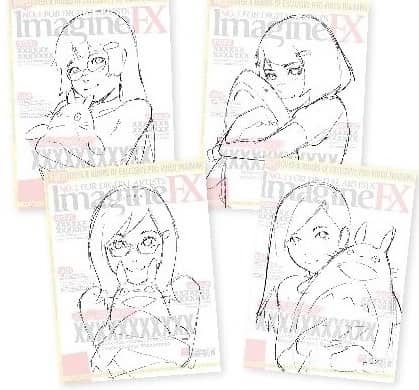
1 Generate rough sketches


هذه القصة من طبعة April 2020 من ImagineFX.
اشترك في Magzter GOLD للوصول إلى آلاف القصص المتميزة المنسقة، وأكثر من 9000 مجلة وصحيفة.
هل أنت مشترك بالفعل؟ تسجيل الدخول
المزيد من القصص من ImagineFX

ImagineFX
HP Omnibook X Flip 16
DOUBLING UP HP's latest Omnibook 2-in-1 is a decent-enough productivity laptop, but it truly shines when it's transformed into tablet mode

2 mins
February 2026

ImagineFX
Phaya Akat - The Sanctuary
“Phaya Akat’s Sanctuary Village began from a simple idea inspired by Thailand’s tradition of boiling eggs in natural hot springs.
1 min
February 2026

ImagineFX
HOW SURFACE NORMALS IMPROVE YOUR 3D ART
Ant Ward explains how to quickly change the way a polygon model looks by adjusting its normals
1 mins
February 2026

ImagineFX
Painting in Procreate: Reimagine Your Surroundings
VISIONARY WORK Across 20 lessons, Mikko Eerola reveals how he brings his ideas to life on the iPad using Procreate
1 mins
February 2026

ImagineFX
Technique focus: WORK SMARTER WITH COLOURS
Álvaro Jiménez reveals the workflow process he follows to summon an armoured demon
1 mins
February 2026

ImagineFX
FIVE MINUTES WITH PAT IMRIE
Big-screen blockbusters and a certain 3D art magazine helped set this creative on his career path
3 mins
February 2026

ImagineFX
RIFF ON YOUR PASSIONS
Max Froer draws on a range of influences when rendering a beast that's part machine
1 min
February 2026

ImagineFX
Anker SOLIX C1000
BOX OF DELIGHTS The chonkiest power bank around is powerful, portable (after a fashion) and boy is it well built
2 mins
February 2026

ImagineFX
PAINTING A SCENE OF GREEK DRAMA
Alexander Leskinen creates a stormy environment featuring harpies, the winged messengers of Zeus.
3 mins
February 2026

ImagineFX
HOW DO I COLOUR A 3D OBJECT?
The process of colouring a 3D image has a lot of layers, so let's start at the surface. Mike Griggs weighs up the material requirements
2 mins
February 2026
Translate
Change font size