Essayer OR - Gratuit
Ultimate Guide To iPhone Photography
MacFormat UK
|September 2021
Discover how to master the controls and settings in your iPhone (and Photos app) to capture well-composed, correctly exposed and artefact-free shots

We all love taking photos on our iPhones – but are we making the best of them? Over the next 12 pages, we’ll show you how to avoid the ‘rubbish in, rubbish out’ syndrome by improving the quality of the images that you shoot, then explaining how you can make them look even better courtesy of the iOS or OS versions of Apple’s Photos (plus we’ll look at some third-party Camera apps along the way).
Newer iPhones give DSLR (Digital Single Lens Reflex) cameras a run for their money. For example, iPhone 11 Pro and 12 Pro users can switch from telephoto to wide to ultra-wide in a few taps (capturing moments that a DSLR user might miss while they manually swap detachable lenses). Thanks to the new Apple ProRAW format iPhone 12 users can capture more information about a subject’s colours and tones, narrowing the image-quality gap between iPhone and DSLR. The iPhone has the edge when it comes to exposure thanks to Smart HDR 3, which uses machine learning to combine multiple exposures that reveal maximum detail in different parts of the scene (even when you capture in ProRAW).
In this feature, we’ll show you tips, tricks and techniques to help improve the composition and quality of your photographs, as well mimicking DSLR looks, such as slow-shutter motion blur.
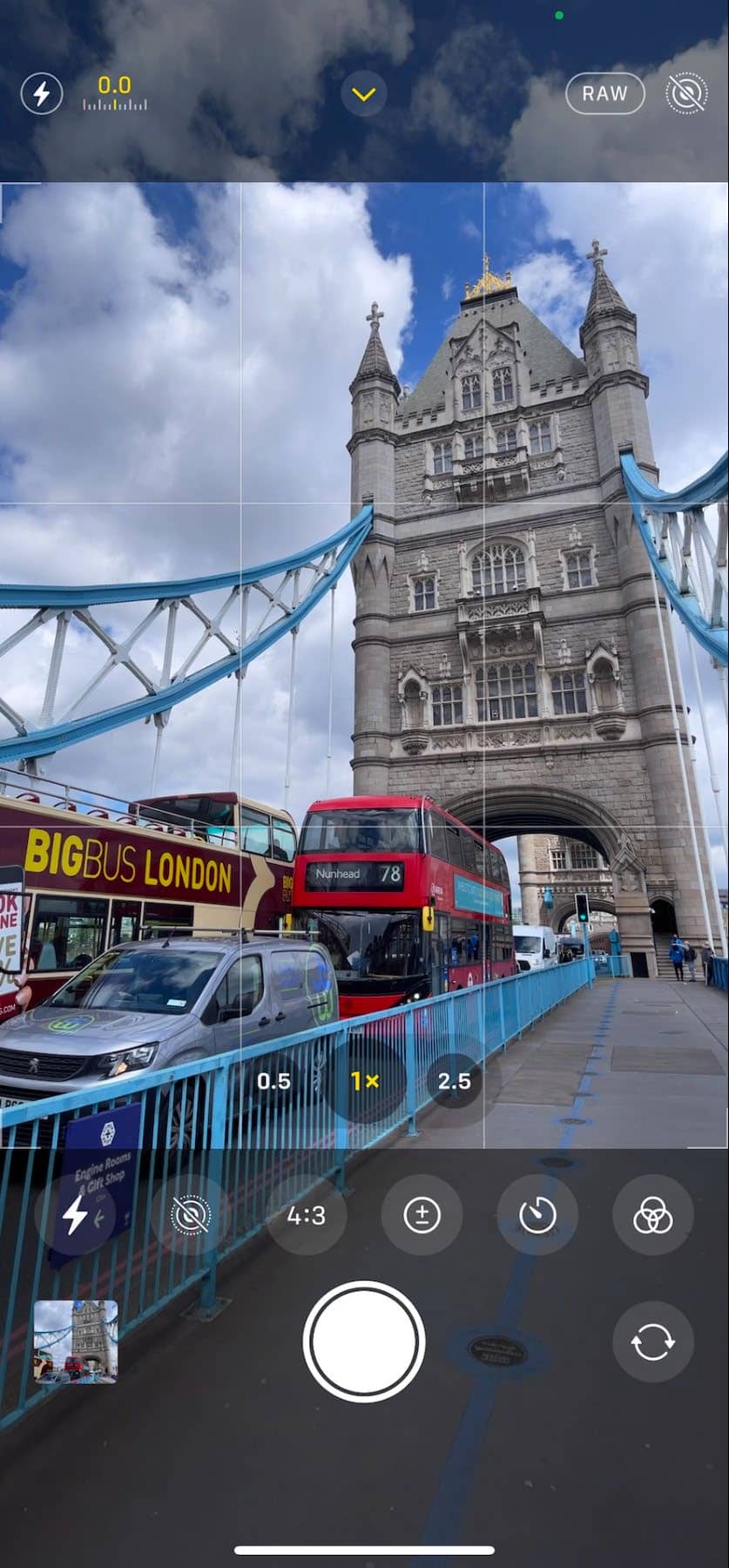
Camera app options
1 Go Raw Tap here to toggle between capturing compressed quality formats, such as JPEG or higher quality Apple ProRAW format files.


Cette histoire est tirée de l'édition September 2021 de MacFormat UK.
Abonnez-vous à Magzter GOLD pour accéder à des milliers d'histoires premium sélectionnées et à plus de 9 000 magazines et journaux.
Déjà abonné ? Se connecter
PLUS D'HISTOIRES DE MacFormat UK
MacFormat UK
Affinity by Canva
A complete creative studio for zero cost

3 mins
February 2026
MacFormat UK
RSRs return from the dead
Apple announced Rapid Security Responses in June 2022, as a new means of applying urgent security patches in between macOS updates.
1 min
February 2026
MacFormat UK
Rediscover albums with Longplay
Fall in love with your albums all over again with this amazing music player
3 mins
February 2026
MacFormat UK
Set up multiple timers on iOS
Discover timers done right
2 mins
February 2026

MacFormat UK
Chants of Sennaar
Work your way beyond being lost in translation
2 mins
February 2026
MacFormat UK
Signature Slim Solar+ wireless keyboard K980
A comfortable, full-size keyboard that's always good to go
2 mins
February 2026
MacFormat UK
One more thing Apple Intelligence
Apple has promised a big AI update in 2026, and Graham Barlow feels nervous
2 mins
February 2026

MacFormat UK
Search any website - fast!
Find your favourite websites faster than ever
3 mins
February 2026

MacFormat UK
Make your ideal web browser
Make online life easy by making your web browser work your way
2 mins
February 2026

MacFormat UK
Best home printers & all-in-ones
We put six all-round home models through their printing paces
7 mins
February 2026
Translate
Change font size