Prøve GULL - Gratis
Go further in Luminar Neo
MacFormat UK
|August 2022
How to use Al-assisted tools to quickly enhance your people pics

IT WILL TAKE 10 minutes
YOU WILL LEARN How to use AI to improve complexions, add impact to eyes and create a soft-focus background
YOU’LL NEED Luminar Neo, macOS 10.14.6
People are one of the most common photographic subjects. To reflect this fact, Luminar Neo (£67, from skylum.com) has an Edit workspace that provides a comprehensive collection of portrait-enhancing tools.
Traditionally, portrait retouchers using apps such as Lightroom Classic would deploy brush-based tools to manually target and tweak the colours and tones of features, such as eyes and skin. Thanks to its Machine Learning (ML) component, Luminar Neo enables you to retouch portraits more quickly.
Luminar Neo can recognise that a person is in the picture, enabling it to automatically blur their background to create a flattering bokeh without you needing to spend lots of time making a manual selection. The app also recognises the components of a face so you can instantly adjust the properties of the subject’s eyes, mouth, and even eyebrows by dragging sliders. Again, no manual selections are required to target specific parts of the face. We’ll show you how to put the most useful portrait-enhancing tools through their AI-assisted paces.
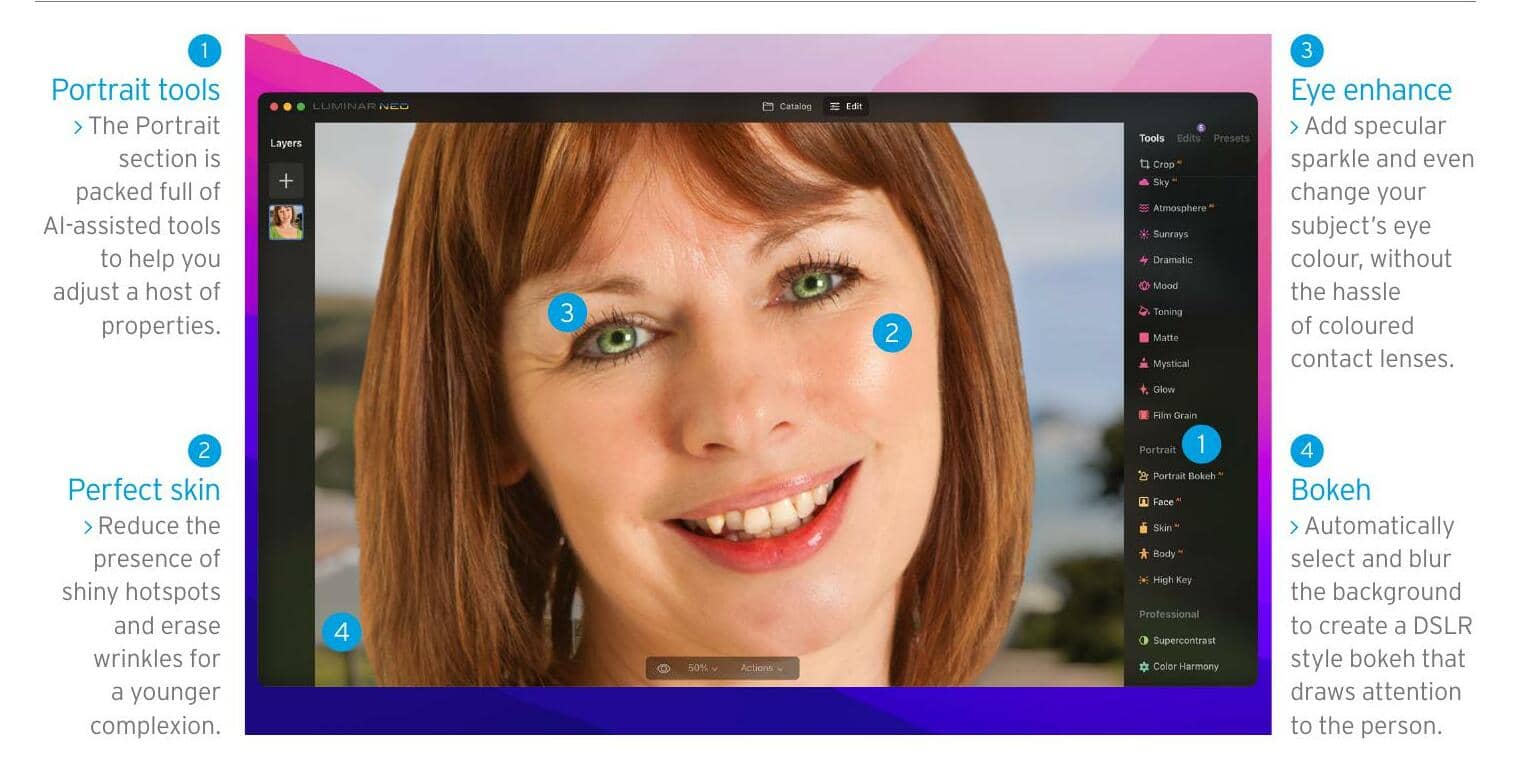
EXPLAINED... The Luminar Neo Edit workspace


Denne historien er fra August 2022-utgaven av MacFormat UK.
Abonner på Magzter GOLD for å få tilgang til tusenvis av kuraterte premiumhistorier og over 9000 magasiner og aviser.
Allerede abonnent? Logg på
FLERE HISTORIER FRA MacFormat UK
MacFormat UK
Affinity by Canva
A complete creative studio for zero cost

3 mins
February 2026
MacFormat UK
RSRs return from the dead
Apple announced Rapid Security Responses in June 2022, as a new means of applying urgent security patches in between macOS updates.
1 min
February 2026
MacFormat UK
Rediscover albums with Longplay
Fall in love with your albums all over again with this amazing music player
3 mins
February 2026
MacFormat UK
Set up multiple timers on iOS
Discover timers done right
2 mins
February 2026

MacFormat UK
Chants of Sennaar
Work your way beyond being lost in translation
2 mins
February 2026
MacFormat UK
Signature Slim Solar+ wireless keyboard K980
A comfortable, full-size keyboard that's always good to go
2 mins
February 2026
MacFormat UK
One more thing Apple Intelligence
Apple has promised a big AI update in 2026, and Graham Barlow feels nervous
2 mins
February 2026

MacFormat UK
Search any website - fast!
Find your favourite websites faster than ever
3 mins
February 2026

MacFormat UK
Make your ideal web browser
Make online life easy by making your web browser work your way
2 mins
February 2026

MacFormat UK
Best home printers & all-in-ones
We put six all-round home models through their printing paces
7 mins
February 2026
Translate
Change font size